What Is an AI Agent? A 5-Minute Practical Primer
AI agents are everywhere in the headlines, but what do they actually do? This primer cuts through the noise and explains agents through a developer's task list that runs itself — then maps the 12-day series ahead.
5 min read
"AI agent" is one of the most overloaded terms in software right now. Every SDK, every product, and every conference talk seems to use it differently. Before we write a single line of code in this series, let's pin down what an agent actually is — and what separates it from the AI tools you've already used.
The Task List Analogy
Imagine you leave a detailed task list for a junior developer before going on holiday:
- Pull the latest data from the payments API.
- If any transaction is over $10,000, flag it in the spreadsheet.
- Send a Slack message to the compliance channel with a summary.
- If the API is down, retry three times and email me if it still fails.
That list describes a goal (monitor large transactions) and a set of actions the developer can take to achieve it. The developer reads the list, reasons about the current state of the world (is the API up? are there flagged transactions?), takes actions (calls the API, writes to the spreadsheet, sends a Slack message), and adapts when things go wrong (retries, then escalates).
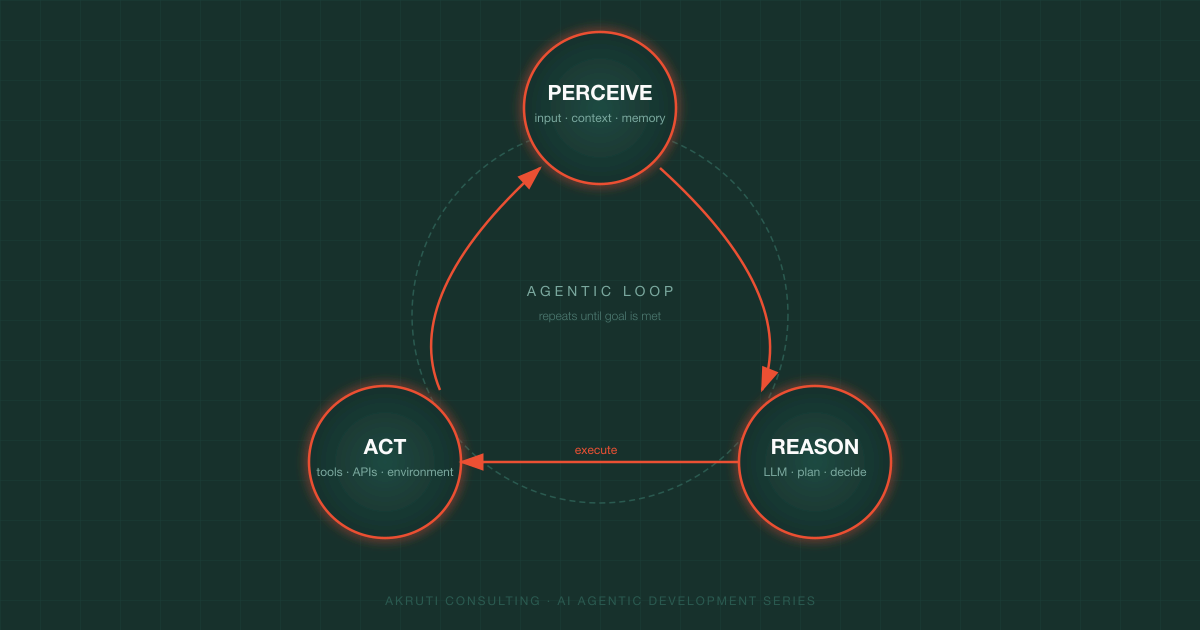
An AI agent is that junior developer, running autonomously. It perceives its environment, reasons about what to do next, takes actions through tools, and loops until the goal is met.
The Three Primitives
Every agent — regardless of the SDK or model — is built on three primitives:
| Primitive | What it means | Developer analogy |
|---|---|---|
| Perceive | Receive input from the environment (user messages, tool results, memory) | Reading the task list and checking the current state |
| Reason | Use a language model to decide the next action | Thinking through which step to take and why |
| Act | Execute an action via a tool (API call, file write, web search) | Actually calling the payments API or sending the Slack message |
The agent repeats this loop — perceive → reason → act → perceive again — until it reaches the goal or hits a stopping condition.
Agents vs. Chatbots vs. Pipelines
Three terms that are often conflated:
Chatbot — responds to a single turn of input and returns a single response. It has no tools, takes no external actions, and has no memory beyond the current conversation window. Think: a customer support FAQ bot.
Pipeline — a fixed sequence of LLM calls and transformations, wired together in code. The developer decides every step at build time. The LLM fills in content, but it never decides what step comes next. Think: summarise article → translate → post to CMS.
Agent — the LLM itself decides what actions to take and in what order, based on the current state of the world. The developer provides the goal and the available tools; the agent figures out the path. Think: the task list developer from the analogy above.
| Chatbot | Pipeline | Agent | |
|---|---|---|---|
| Decides next step | No | No (hardcoded) | Yes |
| Uses external tools | Rarely | Sometimes | Always |
| Adapts to failures | No | Sometimes | Yes |
| Memory across turns | Sometimes | No | Yes |
The key distinguishing feature of an agent is dynamic decision-making — the model chooses its own actions rather than following a script.
A Concrete Example: A Code-Review Agent
Here is what a real agentic loop looks like for a simple code-review agent:
Goal: "Review the open pull request #42 and flag any security issues."

Turn 1 — Reason: I need to fetch the diff for PR #42.
Turn 1 — Act: call get_pull_request_diff(pr=42)

Turn 2 — Perceive: diff returned (200 lines changed in auth module)
Turn 2 — Reason: I should analyse the diff for SQL injection and hardcoded secrets.
Turn 2 — Act: call analyse_code(diff=..., checks=["sql_injection", "hardcoded_secrets"])

Turn 3 — Perceive: two issues found
Turn 3 — Reason: I should post a review comment on the PR.
Turn 3 — Act: call post_review_comment(pr=42, body="Found 2 issues: ...")

Turn 4 — Perceive: comment posted successfully
Turn 4 — Reason: Goal is achieved. Stop.
Notice that nowhere in this loop is the developer deciding step-by-step what to do. The LLM reads the result of each tool call and decides what comes next. That's agency.
What This Series Covers
Over the next 12 days we'll go from zero to a production-grade agentic pipeline, covering:
- Days 2–4 — First agents with the Anthropic Claude SDK and OpenAI Agents SDK, plus a direct side-by-side comparison
- Day 5 — Memory patterns (short-term, long-term, episodic)
- Day 6 — NVIDIA Nemotron 3: running open-weight agents locally
- Day 7 — Model Context Protocol (MCP): standardising tool access
- Day 8 — OpenAI Assistants API: files, code interpreter, and retrieval
- Day 9 — RAG: giving your agent a long-term knowledge base
- Day 10 — Multi-agent orchestration with LangGraph
- Days 11–12 — Production deployment and evaluation strategies
Every post is self-contained — you can read them in order or jump to the topic you need. Each one includes working code you can run immediately.
Before You Start
You'll need:
- Node.js 20+ or Python 3.11+ (examples come in both)
- API keys for Anthropic and OpenAI — both have free trial credits
- A code editor (VS Code recommended)
Tomorrow we'll write our first real agent: a tool-using Claude agent that looks up live weather data, with the full request-response loop explained line by line.